
Investigation Approach
This TryHackMe challenge was a great opportunity to practice log analysis while also reinforcing what I’ve been learning in Python. Instead of manually reviewing each log file, I challenged myself to write a simple Python script to help identify key indicators of attacker behavior.
Rather than attempting to extract every possible data point from the logs, I focused on answering the core investigation questions outlined in the challenge prompt:
- What tools did the attacker use?
- What endpoints did the attacker try to exploit?
- What endpoints were vulnerable?
These questions closely mirror the way I approach real-world triage: identify tooling, understand attacker intent, and determine where exploitation was likely successful.
Script Design
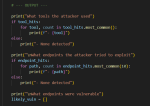
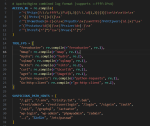
I began by deciding exactly what I wanted the script to output. Before writing any complex logic, I mapped each investigation question to a clear, readable print statement. From there, I built the script incrementally using basic if / else logic and pattern matching.
The goal was not to build a fully featured parser or SIEM replacement, but rather a lightweight tool that could quickly surface meaningful conclusions from the logs.
Script Output
Once the script was complete, I ran it against the log files provided in the challenge. The output was intentionally minimal and focused only on the three investigation areas.

At this stage, simplicity was a deliberate design choice.

While the script could be extended to include counts, timelines, or additional context, I prioritized clarity over complexity.
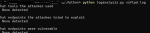
A tool that produces clear conclusions is often more useful during triage than one that produces excessive detail.
Challenge Questions Answered Using the Script
Using the script output, I was able to confidently answer the questions from the challenge:
What tools did the attacker use?
nmaphydrasqlmapcurlferoxbuster
What endpoint was vulnerable to a brute-force attack?
/rest/user/login
What endpoint was vulnerable to SQL injection?
/rest/products/search
What parameter was used for the SQL injection?
q
What endpoint did the attacker try to use to retrieve files?
/ftp
The script helped surface these answers quickly by correlating suspicious request patterns, User-Agent strings, and response behavior across the logs.
Planned Improvements
This script is intentionally simple, but there are several areas I plan to improve as I continue developing it:
- Support additional log types (e.g., authentication and FTP logs)
- Handle multiple log files in a single run
- Improve tool detection, including behavioral indicators rather than relying solely on User-Agent strings
Each of these enhancements would increase accuracy while still preserving the script’s core design philosophy.
Final Thoughts
This project reinforced the importance of intentional simplicity in security tooling. Rather than building a script that extracts every possible data point, I focused on producing output that directly supports investigative decisions.
It also emphasized that automation works best when it reinforces analytical reasoning. The script does not attempt to make final determinations; instead, it highlights areas that warrant closer human review. This balance helps maintain accuracy while ensuring analysts remain accountable for conclusions.
Overall, this challenge was a valuable exercise in combining hands-on detection logic with Python automation, and it reflects the way I approach real-world security investigations.

